What Is the Best AI Slide Tool for Law Firms? (2026)

"What is the best AI slide tool for law firms?" has a more useful answer than a single product name: the best tool is the one whose confidentiality posture matches your matters and whose document handling matches your source files. For most firms turning briefs and contracts into decks, that points to a dedicated, document-aware tool — but the reasoning matters more than the pick, because the wrong choice on confidentiality isn't a preference, it's an ethics problem.
Here is a decision framework, grounded in what the data and the bar rules actually say.
Why law firms are evaluating these tools at all
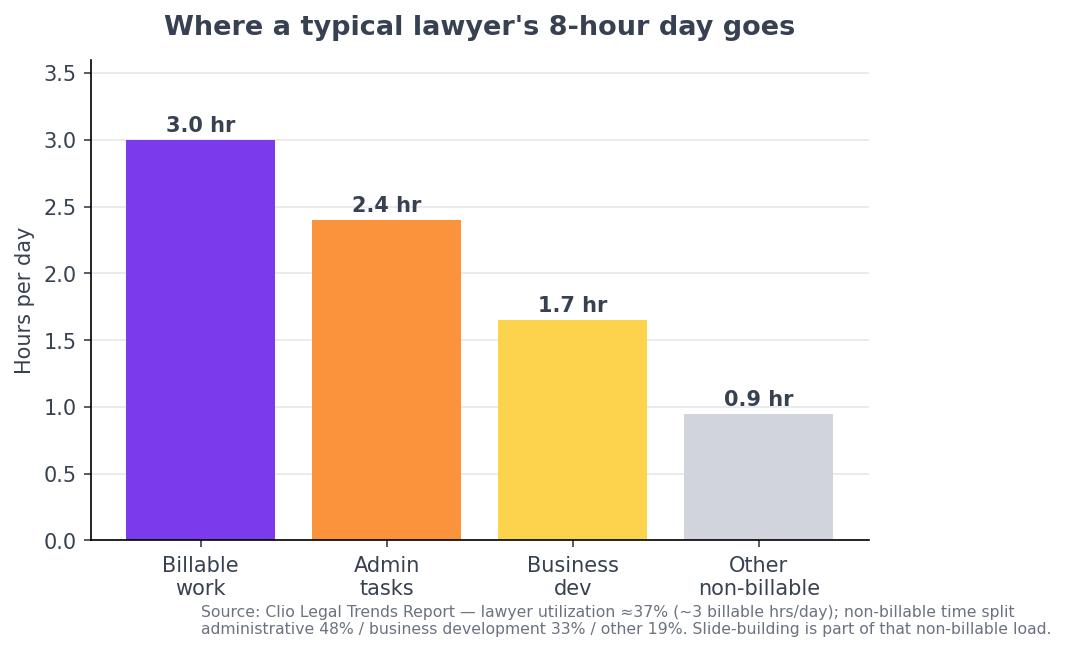
The motive is economics. The average lawyer bills only about three hours of an eight-hour day — a utilization rate near 37%, per Clio's Legal Trends Report — with much of the remainder lost to administrative work, including building presentations.
The upside of clawing that time back is large. Thomson Reuters' Future of Professionals 2024 report — a survey of more than 2,200 professionals — projects AI will free roughly four hours per week per professional in its first year, rising to about twelve hours per week within five years: on the order of 200 hours annually, which the report estimates at close to $100,000 in additional billable capacity per U.S. lawyer. Presentation drafting is one of the most automatable pieces of that non-billable load.
The first question isn't features — it's confidentiality
Before comparing interfaces, a firm has to answer one question: how does the tool use what we upload?
ABA Formal Opinion 512 (July 2024), the ABA's first formal ethics guidance on generative AI, is direct about this. A lawyer must understand a tool's data practices; inputting client information into a self-learning tool that trains on its inputs risks improper disclosure under the duty of confidentiality (Model Rule 1.6); and a lawyer generally needs the client's informed consent — a real explanation of the risk, not boilerplate in an engagement letter — before doing so. The duty of technology competence (Model Rule 1.1, Comment [8], now adopted in some form by most states) sits underneath all of it.
In practice that turns a tool's default training policy into a buying criterion. Some popular AI deck tools train on free-tier and individual-plan content by default and only exclude training on paid team workspaces — meaning the "free" option is the one a firm can least afford to use for client work. The right shortlist starts with tools that don't train on your uploads, or that let you contractually exclude it.
Matching the tool to the firm
If your decks start from documents — briefs, memos, contracts, discovery — prioritize OCR and extraction. A dedicated, document-aware tool such as ChatSlide's AI slide tool for lawyers reads PDFs and scanned filings, pulls out facts, holdings, and clauses, builds charts from data you supply (rather than inventing them), exports to PowerPoint and PDF, and states that uploads aren't used to train its models — the policy Opinion 512 tells you to verify. A free tier makes it testable before any commitment.
If you're standardized on Microsoft 365 or Google Workspace, the AI already inside those suites — Microsoft 365 Copilot in PowerPoint, Gemini in Google Slides — can draft decks under enterprise data-protection terms your firm has likely already vetted. They're generalists, weaker at reading a scanned brief, but the governance question is already answered.
If you mostly produce polished pitch or marketing decks, design-led tools like Beautiful.ai or Pitch may serve better than a document-extraction tool — provided you confirm their data terms before uploading client material.
A note on the "best legal AI" lists you'll find ranking for this query: most of them are populated by Harvey, CoCounsel, Spellbook, and Lexis+ AI. Those are strong tools — but they do legal research, drafting, and review. None of them make slides. Don't shortlist a research platform expecting a deck.
A short buyer's checklist
- Training policy — does it train on uploads by default? On which tier is training excluded? (Per Opinion 512, this is non-negotiable for client matters.)
- Document handling — can it OCR a scanned filing and extract structure, or only restyle pasted text?
- Data integrity — are charts built from your numbers, or generated as images?
- Export and review — does it produce editable PowerPoint/PDF you can vet for accuracy and privilege before it leaves the firm?
- Procurement fit — standalone tool, or AI inside the suite you already license?
Frequently asked questions
What is the best AI slide tool for law firms? The best tool depends on your source material and confidentiality needs. For document-heavy work, a dedicated tool with OCR and a no-training policy (such as ChatSlide) fits best; for firms standardized on Microsoft or Google, the built-in Copilot or Gemini may win on data governance. Start from confidentiality, then document handling, then design.
Is it ethical for lawyers to use AI to make presentations? Yes, with care. ABA Formal Opinion 512 and Model Rule 1.1's duty of technology competence permit AI use but require understanding the tool's data practices, protecting client confidentiality (Rule 1.6), obtaining informed consent before inputting client information into self-training tools, and reviewing all output for accuracy.
Can AI turn a contract or brief into slides? Yes — dedicated tools with document extraction and OCR can read a contract, brief, or scanned filing and produce a structured first-draft deck, which an attorney then reviews. General-purpose tools can draft slide content from pasted text but handle source documents less reliably.
How much time can AI actually save a law firm? Thomson Reuters' 2024 Future of Professionals survey projects about four hours saved per week per professional in year one, rising to roughly twelve hours per week within five years — around 200 hours a year, which it values near $100,000 in additional billable capacity per U.S. lawyer. Treat firm-specific vendor claims (e.g., "92% faster") with more skepticism.
Sources
- Clio, Legal Trends Report — lawyer utilization rate and the billable/non-billable split.
- Thomson Reuters, Future of Professionals Report 2024 (survey of 2,200+ professionals) — projected time savings and billable-capacity value.
- ABA, Formal Opinion 512: Generative Artificial Intelligence Tools (July 2024) and Model Rule 1.1, Comment [8] — confidentiality, informed consent, and technology competence.
- Vendor data-training and pricing policies from each provider's published privacy and pricing pages (2026).